
"Just connect to the VPN and you're secure." That's what most employees hear. It's also dangerously incomplete.
VPNs are useful tools, but they're not security blankets. Understanding what they actually do — and don't do — is crucial for anyone working remotely.
What VPNs Actually Do
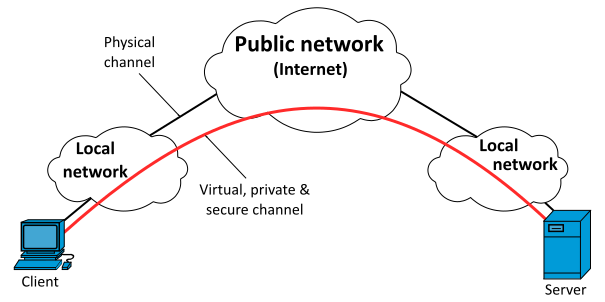
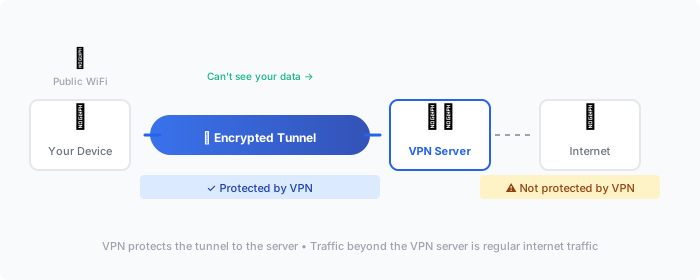
A VPN (Virtual Private Network) creates an encrypted tunnel between your device and a VPN server. That's it. Let's break down what this means in practice.
They Encrypt Your Traffic in Transit
Data traveling between your laptop and the VPN server is encrypted. Anyone intercepting that traffic (coffee shop WiFi sniffers, compromised hotel networks, your ISP) sees encrypted gibberish.
They Hide Your IP Address
Websites and services see the VPN server's IP address, not yours. This provides some privacy and can bypass geographic restrictions.
They Connect You to Internal Resources
Corporate VPNs let you access internal systems — file servers, internal apps, databases — as if you were in the office. This is the main reason companies deploy VPNs.
What VPNs Don't Do
"VPN is not a silver bullet. It protects data in transit, but doesn't protect endpoints, doesn't prevent phishing, and doesn't stop malware. Organizations need defense in depth."
— SANS Institute, Remote Work Security GuidelinesThey Don't Protect Against Malware
If you download malware while connected to a VPN, you still have malware. The VPN encrypts the malware download just like it encrypts everything else.
They Don't Stop Phishing
Clicking a phishing link while connected to the VPN takes you to the phishing site. You're just accessing it through an encrypted tunnel.
They Don't Protect the Endpoints
If your laptop is compromised, the attacker is inside the VPN tunnel with you. Everything you can access, they can access.
They Don't Encrypt Everything
Depending on configuration, split tunneling may send some traffic outside the VPN. And once traffic leaves the VPN server heading to its final destination, it's no longer protected by the VPN.
The Real Risks of Remote Work
Unsecured Networks
Public WiFi is the obvious one. But home networks often aren't much better — default router passwords, outdated firmware, IoT devices with known vulnerabilities sharing the network.
VPN helps: Yes, it encrypts traffic on the local network.
Shared/Family Devices
The family computer with kids' games and sketchy browser extensions is not a work device. Even personal devices used for work can leak credentials through browser extensions, synchronized accounts, or family members.
VPN helps: Not really. The compromise is on the device, not the network.
Physical Security
Coffee shop shoulder surfing. Unlocked laptops at home. Screens visible through windows. A VPN does nothing here.
VPN helps: No.
Blurred Boundaries
Personal and work activities on the same device at the same time. Accidentally uploading personal files to corporate systems, or corporate data to personal cloud storage.
VPN helps: No.
VPN Best Practices
Always Connect Before Doing Work
Make VPN connection the first step, not an afterthought. Some corporate systems are accessible only through VPN anyway, which enforces this. But for systems that work either way, the habit matters.
Understand Your Split Tunnel Configuration
Ask your IT team: "Does our VPN use split tunneling?"
- Full tunnel: All traffic goes through the VPN. More secure, but slower for personal browsing.
- Split tunnel: Only corporate traffic goes through VPN; other traffic goes directly to the internet. Faster, but less secure.
"Split tunneling can reduce VPN bandwidth requirements but may expose users to threats that would otherwise be blocked by corporate security controls."
— CIS (Center for Internet Security), Remote Work SecurityNeither is wrong, but you should know which you're using.
Don't Ignore Connection Warnings
If your VPN client warns that it couldn't connect, or that the certificate is invalid, or that it fell back to a less secure protocol — don't just click through. Report it.
Disconnect When Done
Staying connected to corporate VPN while doing personal browsing routes personal traffic through corporate infrastructure. Your employer can see that traffic. Some find this acceptable; others don't.
Keep the Client Updated
VPN clients have vulnerabilities like any software. When IT pushes an update, install it promptly.
Beyond VPNs: Zero Trust
Modern security thinking has moved beyond "inside the VPN = trusted." Zero Trust architecture assumes no connection is inherently trusted, whether it's from the office, the VPN, or anywhere else.
"Never trust, always verify. Treat every access request as if it originates from an untrusted network, regardless of where it comes from or what resource it accesses."
— NIST Special Publication 800-207, Zero Trust ArchitectureZero Trust Principles
- Verify every request as if it came from an untrusted network
- Grant minimum necessary access (not "VPN = access everything")
- Continuously validate trust (not "authenticated once = trusted forever")
- Assume breach (limit blast radius when compromise happens)
Many organizations are adopting Zero Trust, which may mean less reliance on traditional VPNs and more on identity-aware proxies, continuous authentication, and device health checks.
Personal VPN Services
Consumer VPNs (NordVPN, ExpressVPN, etc.) are different from corporate VPNs. They're primarily for privacy and geo-unblocking, not corporate access.
What They're Good For
- Hiding traffic from your ISP
- Accessing content restricted to other regions
- Adding privacy on untrusted networks when you don't have a corporate VPN
What They're Not
- Anonymous (VPN providers can see your traffic)
- Security tools (same limitations as any VPN)
- A substitute for corporate VPN (they don't connect you to corporate resources)
If you use a personal VPN, understand that you're trusting the VPN provider with your traffic instead of your ISP. Choose accordingly.
Remote Work Security Beyond VPN
VPN is one layer. Remote work security requires multiple layers:
Device Security
- Full disk encryption (BitLocker, FileVault)
- Endpoint protection (antivirus/EDR)
- Automatic updates enabled
- Screen lock after brief inactivity
- Strong login password/biometrics
Account Security
- MFA on everything
- Password manager for unique passwords
- No password sharing
"Defense in depth is essential. No single security control is sufficient. Organizations should implement multiple layers of security controls."
— CISA, Cybersecurity Best PracticesPhysical Security
- Lock screen when stepping away
- Privacy screen in public places
- Secure storage when not in use
- Find My Device enabled
Network Security
- VPN for untrusted networks
- Home router security (change default password, update firmware)
- Separate network for IoT devices if possible
Data Security
- Don't store sensitive data locally if you don't need to
- Use corporate-approved cloud storage, not personal
- Be careful with screenshots, downloads, and prints
Red Flags
Report these to IT immediately:
- VPN repeatedly disconnecting or failing to connect
- Certificate warnings when connecting
- Unexpected MFA prompts (potential attack in progress)
- Someone requesting your VPN credentials (phishing)
- Unknown devices appearing in your accounts
- VPN client asking to install additional software
Key Takeaways
- VPNs encrypt traffic in transit and connect you to internal resources — that's it
- They don't protect against malware, phishing, or endpoint compromise
- Always connect before working, understand your split tunnel config
- VPN is one layer — combine with device, account, and physical security
- Modern Zero Trust approaches may eventually reduce VPN dependence
The VPN is your tunnel, not your shield. Use it properly, but don't rely on it alone.
💬 Comments (0)
Loading comments...