Your employees are drowning in passwords. The average worker manages 100+ login credentials. They cope by reusing passwords, writing them on sticky notes, or resetting them constantly. Each of these "solutions" creates security holes you can't see until it's too late.
Single Sign-On (SSO) fixes this by letting users authenticate once and access everything. But SSO is just one piece of the identity puzzle. Let's break down the alphabet soup — SSO, IAM, PAM — and show you how to implement it without an enterprise budget.
"Identity is the new perimeter. In a world of cloud services and remote work, controlling who can access what — and verifying they are who they claim — is the foundation of security."
— Gartner, Identity-First SecurityThe Identity Alphabet: SSO, IAM, PAM

SSO (Single Sign-On)
One login grants access to multiple applications. User signs into the identity provider once, then seamlessly accesses Slack, Salesforce, AWS, and everything else without re-entering credentials.
The benefit: Fewer passwords to manage, fewer to steal, fewer reset tickets.
IAM (Identity and Access Management)
The broader system that manages who can access what. IAM includes:
- Authentication: Proving you are who you claim to be
- Authorization: Determining what you're allowed to do
- User lifecycle: Onboarding, role changes, offboarding
- Access policies: Rules governing permissions
SSO is a component of IAM. You can't have effective SSO without IAM foundations.
PAM (Privileged Access Management)
Special handling for high-risk accounts — admin credentials, service accounts, root access. PAM adds extra controls:
- Just-in-time access (privileges granted only when needed)
- Session recording and monitoring
- Password vaulting for shared admin accounts
- Approval workflows for sensitive access
"Privileged accounts are the keys to your kingdom. If an attacker compromises a privileged account, they don't need to find vulnerabilities — they have legitimate access to everything."
— CrowdStrike, PAM OverviewWhy SSO Matters (Beyond Convenience)
Security Benefits
Counterintuitively, having one login is more secure than having many:
- Stronger authentication: You can enforce MFA on one login instead of hoping users enable it everywhere
- Instant deprovisioning: Disable one account, revoke access to everything
- Reduced attack surface: Fewer passwords = fewer targets for phishing and credential stuffing
- Centralized monitoring: One place to detect suspicious login patterns
The Offboarding Problem
Without SSO, when an employee leaves, you're hunting through dozens of services to revoke access. Miss one, and that former employee still has a backdoor. With SSO, you disable their identity provider account, and every connected app locks them out immediately.
"Former employees continue to have access to corporate applications, on average, for 2 months after their departure."
— Productiv Research, 2023 SaaS Trends ReportHow SSO Actually Works
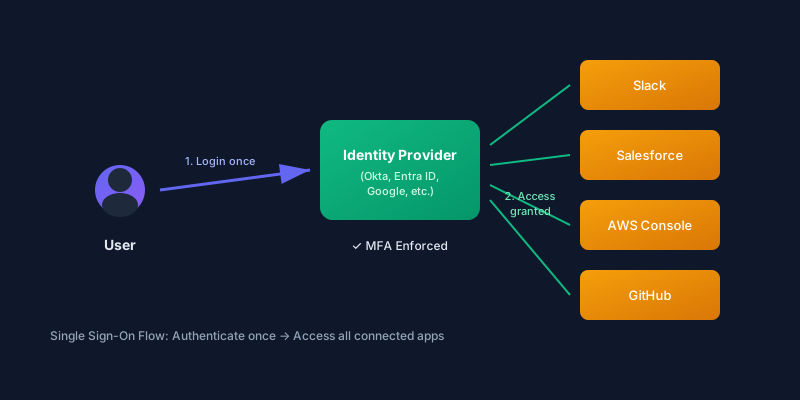
Two main protocols power modern SSO:
SAML 2.0 (Security Assertion Markup Language)
The enterprise veteran. SAML uses XML-based assertions to communicate authentication between the Identity Provider (IdP) and Service Provider (SP). Defined by OASIS standards.
Flow:
- User tries to access an app (Service Provider)
- App redirects to your Identity Provider
- User authenticates with IdP (if not already logged in)
- IdP sends signed SAML assertion back to the app
- App trusts the assertion, grants access
Best for: Enterprise apps, legacy systems, B2B federation.
OIDC (OpenID Connect)
The modern standard, built on OAuth 2.0. Uses JSON instead of XML, designed for web and mobile apps. Specification maintained by the OpenID Foundation.
Best for: Modern SaaS apps, custom applications, mobile.
Most apps support both. When configuring SSO, you'll typically choose based on what the app supports and your IdP's recommendations.
SSO Options for SMBs
You don't need a six-figure Okta contract. Here are realistic options by budget:
Free / Very Low Cost
Google Workspace
If you're already paying for Google Workspace, you have a basic IdP included. You can configure SAML SSO for third-party apps.
- Pricing: Included with Workspace (from $6/user/month)
- Docs: Set up SSO via SAML
- App catalog: Google Workspace Marketplace
- Limitations: Basic SAML only, limited to pre-integrated apps, no SCIM provisioning on lower tiers
Microsoft Entra ID (formerly Azure AD)
The free tier supports SSO for unlimited apps. If you're on Microsoft 365, this is your starting point.
- Pricing: Free tier available; Premium from $6/user/month
- Docs: What is SSO in Entra ID
- App catalog: 3,000+ pre-integrated apps
- Free tier limits: No conditional access, no PIM (privileged identity management)
Authentik (Self-Hosted, Open Source)
Full-featured identity provider you run yourself. Supports SAML, OIDC, LDAP, SCIM, and proxy authentication.
- Pricing: Free (self-hosted); Enterprise support available
- Docs: Authentik Documentation
- GitHub: goauthentik/authentik (45k+ stars)
- Best for: Teams with DevOps capacity who want full control
Keycloak (Self-Hosted, Open Source)
Red Hat's battle-tested open-source IAM. Enterprise-grade features, steep learning curve.
- Pricing: Free (self-hosted); commercial support via Red Hat Build of Keycloak
- Docs: Keycloak Documentation
- GitHub: keycloak/keycloak
- Best for: Organizations with Java expertise and complex federation requirements
Affordable SaaS ($2-15/user/month)
JumpCloud
Cloud directory + SSO + device management. Unified platform for identity across Mac, Windows, Linux.
- Pricing: Free for up to 10 users; then $9-15/user/month
- Docs: SSO Overview
- App catalog: JumpCloud Integrations
- Standout feature: Cross-platform device management included
Cloudflare Access (Zero Trust)
Zero Trust access without a traditional VPN. Sits in front of your apps and verifies identity on every request.
- Pricing: Free for up to 50 users; then $7/user/month
- Docs: Identity & Access Management
- Best for: Protecting internal apps, self-hosted tools, SSH access
- Note: Uses external IdPs (Google, Azure, Okta) — it's an access layer, not a full IdP
Full-Featured SMB Options
Okta
The market leader in identity. Massive app catalog, excellent documentation, premium pricing.
- Pricing: From $2/user/month (SSO only) to $15+ (Adaptive MFA, Lifecycle Management)
- Docs: Okta Documentation
- App catalog: 7,400+ integrations
- Best for: Companies planning to scale, heavy SaaS users
OneLogin
Strong SAML support, competitive pricing, now part of One Identity.
- Pricing: From $4/user/month
- Docs: OneLogin Knowledge Base
- Best for: Cost-conscious teams wanting Okta-like features
Duo (Cisco)
Started as MFA-first, now includes full SSO. Strong device trust features.
- Pricing: Free for up to 10 users; then $3-9/user/month
- Docs: Duo Documentation
- Best for: Organizations prioritizing MFA and device health checks
Implementing SSO: Step by Step
Step 1: Inventory Your Apps
List every SaaS app your company uses. For each, note:
- Does it support SSO? (Check their docs or sso.tax for the SSO tax tracker)
- Which protocols (SAML, OIDC)?
- Is SSO included in your plan or a paid add-on?
Warning: Many SaaS vendors charge extra for SSO ("the SSO tax"). Budget for this or negotiate. Some apps only enable SSO on enterprise tiers. The SSO Wall of Shame tracks which vendors gatekeep this security feature.
Step 2: Choose Your Identity Provider
Pick based on:
- What you already have (Google Workspace? Microsoft 365?)
- Budget
- Technical capacity (can you self-host?)
- Integration requirements (check IdP app catalogs above)
Step 3: Start with High-Value Targets
Don't try to SSO-enable everything at once. Prioritize:
- Email/Calendar — If not already your IdP
- Cloud storage — Google Drive, Dropbox, OneDrive
- Communication tools — Slack, Teams, Zoom
- Business-critical apps — CRM, ERP, finance
- Dev tools — GitHub, AWS, cloud consoles
Step 4: Enforce MFA at the IdP
This is the magic of SSO — enforce MFA once, protect everything. Configure your IdP to require:
- MFA for all users (not optional)
- Phishing-resistant MFA for admins (YubiKey, Google Titan)
- Step-up authentication for sensitive apps
"MFA can block over 99.9% of account compromise attacks."
— Microsoft Security ResearchStep 5: Configure Conditional Access
Modern IdPs let you create policies like:
- Block logins from unusual locations
- Require managed devices for certain apps
- Enforce re-authentication for sensitive actions
- Restrict access by time of day or risk level
See: Microsoft Conditional Access docs | Okta Policies
Privileged Access: Don't Forget PAM
SSO handles your regular users. But what about admin accounts, service accounts, and root credentials?
The Admin Account Problem
Many organizations have shared admin passwords stored in:
- Shared spreadsheets (terrible)
- Password managers (better)
- Someone's memory (worst)
When someone with admin access leaves, you should rotate every credential they knew. Nobody does this consistently.
PAM Solutions by Budget
Budget-Friendly Password Vaults
- Bitwarden Teams/Enterprise — From $4/user/month. Shared vaults with access logging and event tracking.
- Keeper Business — From $3.75/user/month. Password vault with secrets management and breach monitoring.
- 1Password Business — $7.99/user/month. Includes SIEM integration and advanced reporting.
Full PAM Solutions
- CyberArk PAM — The enterprise standard. Session recording, secrets rotation, just-in-time access. Enterprise pricing.
- BeyondTrust — Strong for hybrid (cloud + on-prem). Includes vendor privileged access.
- Delinea Secret Server — Good mid-market option. Free tier for up to 10 users.
- HashiCorp Vault — Developer-focused secrets management. Open source core, enterprise features paid.
Minimum PAM Practices
Even without dedicated PAM software:
- Separate admin accounts — Admins get a daily-driver account AND a privileged account
- MFA everywhere — Especially for admin consoles
- Audit logging — Know who accessed what, when
- Just-in-time access — Grant admin rights temporarily, not permanently (see: Entra PIM)
- Break-glass procedures — Documented emergency access that doesn't bypass all controls
Common SSO Mistakes
Mistake 1: SSO Without MFA
SSO consolidates authentication. If that single authentication is password-only, you've created a master key that's easy to steal. Always enforce MFA at the IdP level.
Mistake 2: Ignoring App-Level Passwords
Some apps support SSO but also allow local passwords. If you don't disable local auth, users can bypass SSO entirely. Audit and disable local authentication where possible.
Mistake 3: Poor Offboarding Process
SSO makes offboarding easier, but only if you actually disable accounts promptly. Build a checklist that HR triggers on every departure.
Mistake 4: No Break-Glass Access
If your IdP goes down, can anyone access anything? Maintain documented emergency procedures with separate credentials stored securely offline.
Mistake 5: Skipping the App Inventory
Shadow IT is real. Users sign up for apps IT doesn't know about. These apps won't be covered by SSO. Regularly audit for unknown SaaS subscriptions. Tools like Intello or Productiv can help with SaaS discovery.
SSO Security Checklist
- ☐ All users authenticate through the IdP (no local passwords)
- ☐ MFA enforced for all accounts
- ☐ Phishing-resistant MFA for privileged accounts
- ☐ Conditional access policies configured
- ☐ Session timeouts appropriate for risk level
- ☐ Login anomaly detection enabled
- ☐ Offboarding process disables IdP account immediately
- ☐ Break-glass procedures documented and tested
- ☐ Regular audit of connected applications
- ☐ Privileged accounts separated and monitored
Further Reading
- NIST Digital Identity Guidelines (SP 800-63) — The authoritative standard for identity verification
- OWASP Authentication Cheat Sheet — Developer-focused auth best practices
- CISA MFA Guidance — Government recommendations for implementing MFA
- FIDO Alliance Passkeys — The future of passwordless authentication
- ENISA eIDAS & Trust Services — EU guidance on electronic identification and authentication
- ENISA NIS2 Directive — EU's updated network security requirements (includes access control mandates)
- ENISA Threat Landscape — Annual EU cyber threat report with identity-related attack trends
Quick Actions
- Audit your IdP options — Already have Google Workspace or Microsoft 365? Start there.
- List your top 10 apps — Check SSO support for each
- Enable SSO for one app this week — Start simple, build momentum
- Enforce MFA at the IdP — This is non-negotiable
- Document your offboarding checklist — Make sure IdP disable is step one
Password chaos is a choice. You can keep playing whack-a-mole with credential breaches, or you can consolidate authentication and actually control it. SSO isn't magic — it's just good architecture.
💬 Comments (0)
Loading comments...