"Look for typos and grammar mistakes." That's the phishing advice most people get. It's also becoming useless.
Modern phishing emails are well-written, professionally designed, and convincing. Attackers use AI tools to fix their grammar. They clone real emails pixel-by-pixel. They do their research.
Here's what actually works for spotting phishing in 2026.
The Old Advice Is Failing
"Check for Spelling and Grammar Errors"
Modern phishing emails are often flawless. Attackers use professional copywriters, steal real email templates, or use AI to polish their writing. Perfect grammar doesn't mean it's safe.
"Nigerian Prince Emails Are Obvious"
Yes, crude spam is obvious. But that's not where the real danger is. Targeted phishing (spear phishing) looks exactly like legitimate business email — because it's designed to.
"Spear-phishing emails are crafted to appear as though they come from a trusted source and are tailored to the specific victim. They often contain no malicious links or attachments in the initial contact."
— FBI Internet Crime Complaint Center, Annual Report"Hover Over Links to Check Them"
Still useful, but attackers know you do this. They use lookalike domains that are hard to spot on quick inspection: microsoft-support.com, paypa1.com, app1e.com. Many people hover, glance, and click.
What Actually Matters
1. Unexpected Requests
The most reliable indicator isn't technical — it's contextual. Ask yourself:
- Was I expecting this email?
- Does this request make sense given my relationship with the sender?
- Is this how this person/company normally communicates?
Your bank emails you to "verify your account immediately"? Did you do anything that would trigger verification? No? That's a red flag.
2. Urgency and Pressure
Phishing relies on short-circuiting your critical thinking. Common pressure tactics:
- "Your account will be suspended in 24 hours"
- "Act now or lose access"
- "Immediate action required"
- "Don't share this with anyone else"
"Social engineers exploit human psychology — urgency, fear, curiosity, and the desire to be helpful. The best defense is to slow down and verify through a separate channel."
— SANS Security Awareness, Training GuidelinesLegitimate organizations rarely create artificial urgency. When they do need action, they usually provide multiple ways to verify.
3. The Actual Sender Address
Not the display name — the actual email address. "Microsoft Support" can be the display name for any email address. Look at what's after the @.
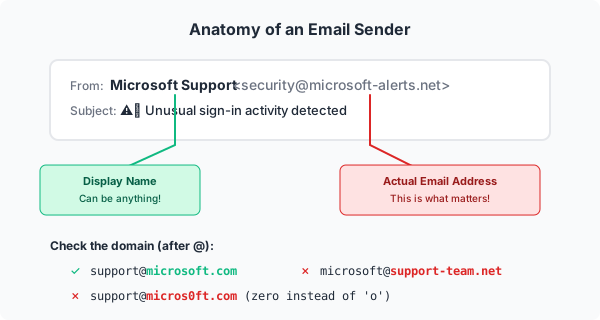
Examples:
support@microsoft.com✓ Legitimatemicrosoft@support-team.net✗ Not Microsoftsupport@micros0ft.com✗ Lookalike domainsupport@microsoft.com.secure-verify.net✗ Subdomain trick
The real domain is immediately before the slash in URLs and after the @ in emails. Everything else can be manipulated.
4. Link Destination vs. Context
Before clicking, hover (or long-press on mobile) to see where a link goes. Then ask: does this destination match the context?
An email from "your bank" that links to a random domain? Red flag. An email from "IT support" that links to a Google Form? Suspicious. A password reset link that goes to a URL shortener? Don't click it.
5. Requests for Credentials or Sensitive Data
Legitimate organizations almost never ask for passwords via email. They also don't ask for:
- Full Social Security numbers
- Complete credit card numbers
- Two-factor authentication codes
- "Verification" that requires entering your password on a new page
"No legitimate organization will ever ask you to provide your password via email. If you receive such a request, it is a phishing attempt."
— CISA, Phishing GuidanceIf an email asks for credentials, go directly to the service (type the URL yourself, don't click the link) and check if there's actually an issue.
Types of Phishing
Mass Phishing
Same email sent to thousands. Relies on volume — if 0.1% click, that's enough. Usually generic: "Dear Customer," "Your account," etc.
Spear Phishing
Targeted at specific individuals. Uses research: your name, company, role, recent activities. Much harder to detect because it looks like real business email.
Example: "Hi [Your Name], following up on the Q4 budget discussion. Please review the attached spreadsheet before Friday's meeting."
Whaling
Spear phishing targeting executives. High-value targets get high-effort attacks. May involve extensive reconnaissance and carefully crafted pretexts.
Business Email Compromise (BEC)
Attackers compromise or impersonate a real business email account. They insert themselves into existing conversations, change payment details on invoices, or request wire transfers.
"BEC schemes have caused over $50 billion in losses globally. The average loss per incident exceeds $120,000."
— FBI IC3, 2023 Internet Crime ReportThese are devastating because the email comes from (or appears to come from) a trusted contact.
Smishing (SMS Phishing)
Same concept, text messages. "Your package couldn't be delivered, click here to reschedule." Short URLs make verification harder.
Vishing (Voice Phishing)
Phone calls. "This is Microsoft support, we've detected a virus on your computer." Caller ID can be spoofed, so the number appearing legitimate means nothing.
Real-World Examples
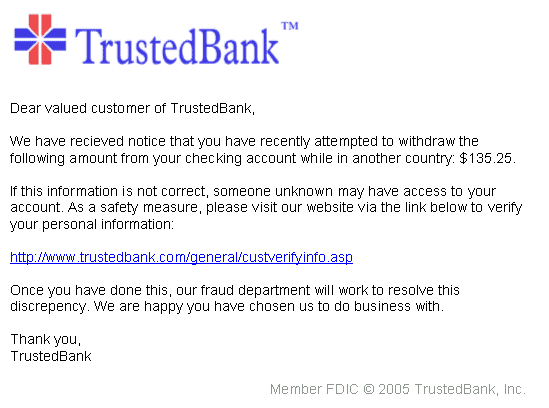
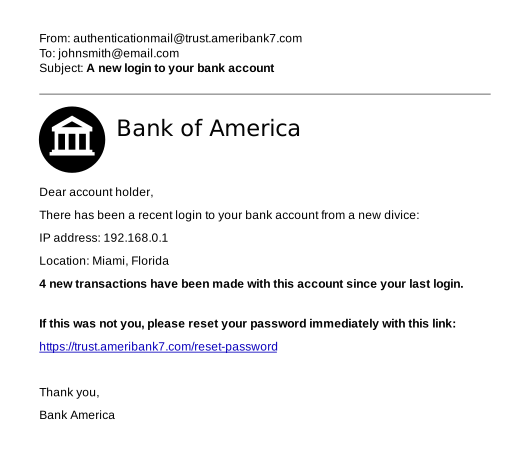
The Classic Password Reset
Subject: Unusual sign-in activity
We detected a sign-in attempt from a new device. If this wasn't you, click here to secure your account immediately.
Why it works: Creates fear and urgency. Uses real security notification templates.
Detection: Go directly to the service and check your recent activity. Don't click the email link.
The Invoice Scam
Subject: Invoice #847291 Due
Please find attached your invoice. Payment is due within 10 days. [Attachment: Invoice.pdf.exe]
Why it works: Many people process invoices without thinking. Attachment name disguises malware.
Detection: Do you have a business relationship with this sender? Check the file extension carefully.
The IT Support Impersonation
Subject: Action Required: Email Migration
We're upgrading to a new email system. Click here to migrate your mailbox and avoid losing your emails.
Why it works: IT changes are common. Fear of losing email is strong.
Detection: Did IT announce this through official channels? Verify through a separate communication.
The CEO Fraud
Subject: Urgent Wire Transfer
[From: CEO's name, spoofed or compromised email]
I need you to process a wire transfer urgently. This is confidential — don't discuss with others until completed.
Why it works: Authority and urgency combined. Request for secrecy prevents verification.
Detection: Verify any unusual financial request through a different channel. Call the person directly.
When in Doubt
Verify Through a Different Channel
Got a suspicious email from your bank? Call the number on your card (not the number in the email). Email from a colleague seems off? Call or message them directly to confirm.
Go Direct
Never click email links for sensitive actions. Type the URL yourself or use a bookmark. If there's really an issue with your account, you'll see it when you log in normally.
Ask IT/Security
Most organizations want you to report suspicious emails. Forward it to your security team. It's not embarrassing to ask — it's smart.
"Creating a culture where employees feel comfortable reporting suspicious emails — even if they clicked — is essential. Fear of punishment leads to hidden incidents and delayed response."
— NIST Cybersecurity Framework, Awareness & TrainingTake Your Time
Phishing relies on rushing you. Take 30 seconds to think before clicking. The urgency is almost always artificial.
Technical Indicators
For more technical readers:
- Mismatched From: headers — Display name doesn't match email domain
- SPF/DKIM/DMARC failures — Many email clients show warnings for these
- Lookalike domains — Typosquatting, homograph attacks (using similar-looking Unicode characters)
- Suspicious attachments — .exe, .scr, .js, .zip containing executables, Office files with macros
- URL shorteners — Hide the real destination. Expand before clicking (or don't click)
- Non-HTTPS login pages — Any legitimate login page uses HTTPS
What To Do If You Clicked
It happens. If you realize you've clicked a phishing link or entered credentials:
- Change the password immediately — If you entered credentials, change that password NOW. If you reuse passwords (you shouldn't), change those too.
- Enable/verify MFA — Add a second factor if you haven't.
- Report it — Tell your IT/security team. They may need to check for compromised sessions.
- Scan for malware — If you downloaded anything, run a full antivirus scan.
- Monitor accounts — Watch for suspicious activity in the following weeks.
Speed matters. The faster you respond, the less damage an attacker can do.
Summary
Modern phishing detection comes down to:
- Context over content — Does this request make sense?
- Verify separately — Never trust, always verify through another channel
- Go direct — Type URLs yourself for anything sensitive
- Resist pressure — Real emergencies allow time to verify
- Check the real address — Display names mean nothing
You'll never catch 100% of phishing. The goal is to make yourself a hard target and respond quickly when something slips through.
💬 Comments (0)
Loading comments...